
In beta · PD · Formulation
Expert Buffer Designer
Design a buffer from first principles. It tells you what to weigh out, what pH you'll get, and how that pH behaves when the temperature, the salt or a weighing changes.
“What will this buffer's pH actually be at 4 °C instead of 25 °C — and how much has it moved?”
What it works out
Give it a buffer. Get the whole story.
Give it a buffer system, a concentration, a target pH, a salt and a temperature, and it works out:
- how much of each compound to weigh out, in mM and g/L;
- the pH you will actually get, and the ionic strength;
- which charged forms are present;
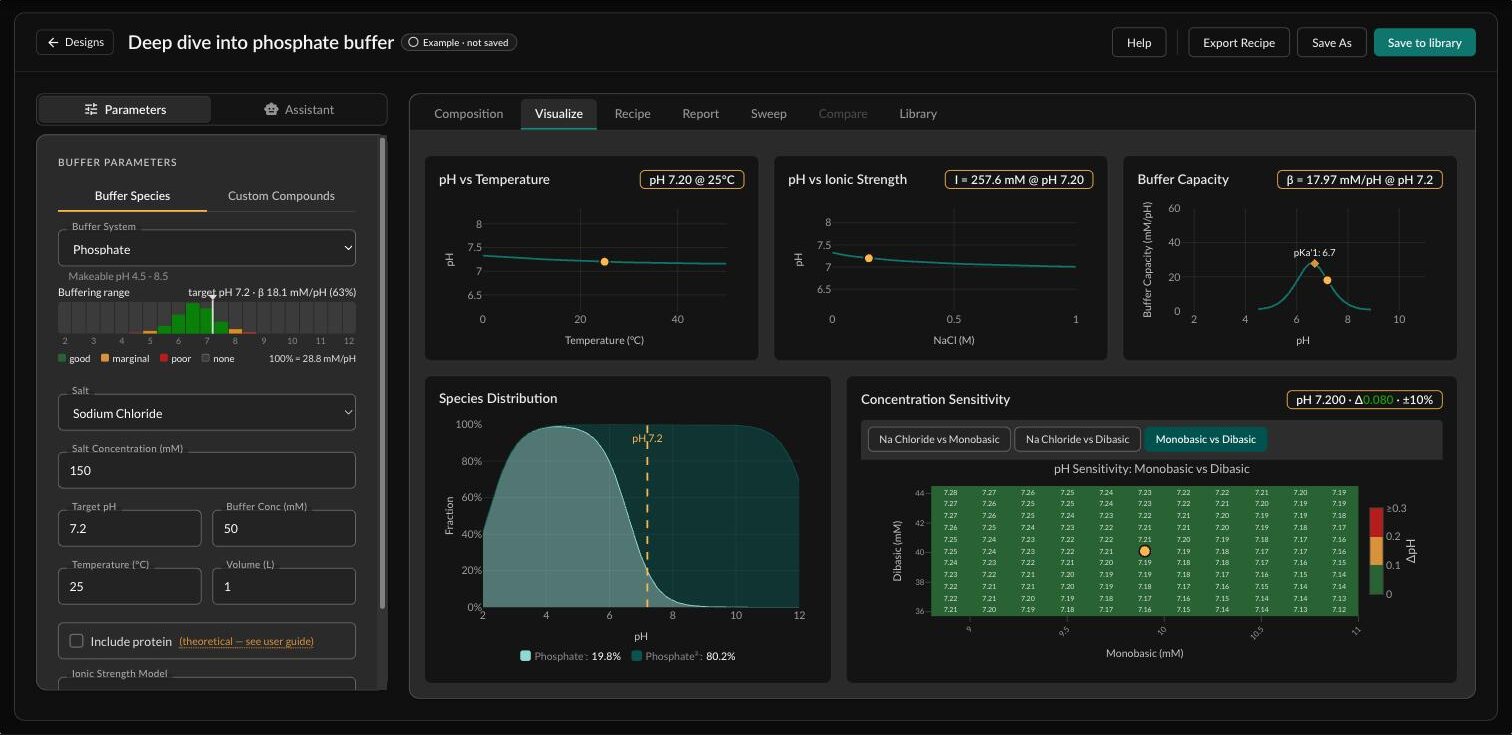
- how well the buffer resists a change in pH — its buffer capacity;
- how its pH moves with temperature, with added salt, and with weighing errors.
Then it turns the design into a preparation worksheet and a report.
Beyond Henderson–Hasselbalch. The textbook equation is a shortcut for one buffering species at low salt. The app doesn't use it: it balances every charge in the solution, across several species, several pKa values, strong acids and bases, and salt.
In the worked example, phosphate's second pKa falls from 7.20 to 6.61 at the buffer's 0.26 M ionic strength — the kind of shift the shortcut never sees.
How you work
From a first guess to a worksheet
-
Open a buffer
Start from the worked example (50 mM phosphate with 150 mM sodium chloride at pH 7.2), from a ready-made set for an antibody process grouped by step — Protein A capture, viral inactivation, AEX, CEX and HIC polish, viral filtration, UF/DF and formulation — from your saved buffers, or from scratch.
-
Design it
Choose a buffer system and see, before you set a pH, the range it can make and how well it buffers at each pH. Set the target pH, concentration, salt, temperature and volume. Or enter the exact compounds yourself and let the app work out how much acid or base reaches your pH.
-
Check it
Composition gives the final pH, what your pH meter should read, the ionic strength, how much of each compound goes in (mM and g/L) and which charged forms are present. Visualize shows how the pH moves with temperature and salt, the buffer capacity across pH, and how far the pH drifts if a weighing is 10% off.
-
Get the recipe
A preparation worksheet for your volume, in the reagent forms on your shelf, anhydrous or hydrate, with the masses to weigh and the meter reading to check against. Open it as a PDF, export CSV, or copy it.
-
Ask what if
Sweep one or two inputs without touching your buffer: make it once and read it anywhere from 4 to 40 °C, or list every system that buffers well at pH 5. Send any row to Compare, which shows up to three buffers side by side.
-
Save and report
Saved buffers go into a library the other apps in the suite can read. The report is a PDF with the design, quality ratings, charts, composition, corrections and the worksheet.
Under the hood
The chemistry that decides the pH
The pH your meter will read
The app's pH is the hydrogen-ion concentration. Beside it, Meter pH gives what a calibrated meter should read, which in working buffers is typically 0.05–0.15 higher. For the worked example: 7.20 in the app, 7.33 on the meter.
Temperature, done properly
Each pKa is moved from 25 °C with the van 't Hoff equation, including the heat-capacity term, using NIST data. A Tris buffer made at pH 8.07 at 25 °C reads about 8.7 at 4 °C.
Salt shifts every pKa
Four ways to correct for ionic strength: Extended Debye–Hückel, Davies, SIT, and Auto, which picks between them. Where its data exist, SIT holds to about 3 M ionic strength.
136 buffer systems
Conjugate pairs such as phosphate, weak acids and bases titrated with a strong base or acid such as MES-NaOH, and two-species systems such as Acetate-Tris — plus 97 compounds for building your own.
Concentrated stocks
Design at working strength, then set a concentration factor. The worksheet scales the masses and gives the stock's own pH, which differs from the working pH because the ionic strength changes on dilution.
One library for the suite
A buffer you save here opens in the Expert Solution Operations Designer with the same composition, ready to add, titrate or dilute.
How far to trust it
Where the numbers hold, and where they stop
Against published pKa data for phosphate, acetate and borate in salt solutions, the typical (root-mean-square) error in pH is:
| Ionic strength | SIT | Extended Debye–Hückel |
|---|---|---|
| Up to 0.25 M | 0.02 | 0.03 |
| 0.25–1 M | 0.07 | 0.23 |
| Above 1 M | 0.28 | 0.52 |
The individual corrections are also checked against published measurements: acetate in salt solutions (Pezza, 1996); histidine, arginine, aspartate and glutamate (Bretti, 2018); Tris up to 5 M sodium chloride (Palmer, 1987); Bis-Tris (Wesolowski, 1989); and borate (Raposo, 2003). pKa values follow the NIST critical compilation (Goldberg et al., 2002).
What the model leaves out
Carbon dioxide from the air; metal ions binding to buffers; ammonium as a buffer; organic co-solvents; solubility; the volume change on dissolving; temperature data for about twenty buffers, including Bis-Tris; and real proteins.
Every number is theoretical. Measure the pH of the buffer you make before you use it.
Looking for the original app?
Expert Buffer Designer Classic still runs on the web and on iOS. This is its successor, rebuilt on the suite's engine. About the classic app →